Use the AI Study Tool
The AI Study Tool is an intelligent study assistant in your course. It helps students understand, retain, and apply course material. Embedded in an eTextbook reading, it eliminates the need to leave the required course material for help. Instead, real-time study support is available within the assigned materials.
 Where can I use the AI Study Tool?
- The AI Study Tool is available in select titles and will expand to more titles in the future.
- The AI Study Tool only shows on Reading pages. It is not available on quizzes, tests, or other learning tools or assessments.
- The AI Study Tool shows on Reading pages that have embedded assessment questions. It does not provide answers. Instead, it guides students through concepts and helps them work through comparable problems.
- Instructors cannot disable the AI Study Tool.
How do I use the AI Study Tool?
- From the Dashboard, select an assignment or chapter.
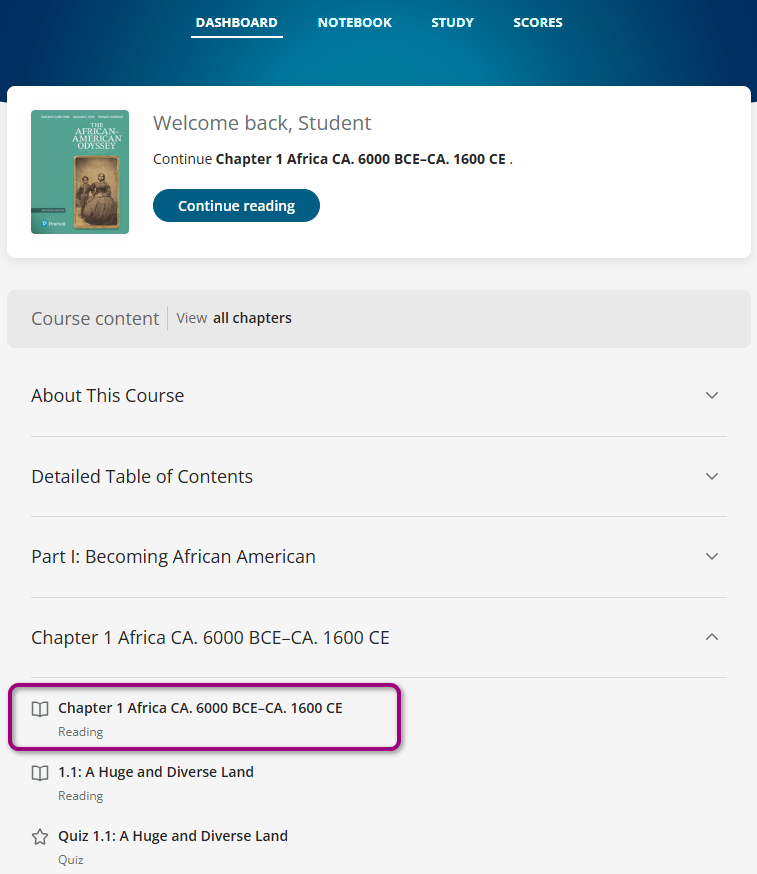
The assignment opens in the eTextbook reader.
If available in the course, the AI Study Tool icon shows in the bottom-right corner.
- Select
 to open the AI Study Tool.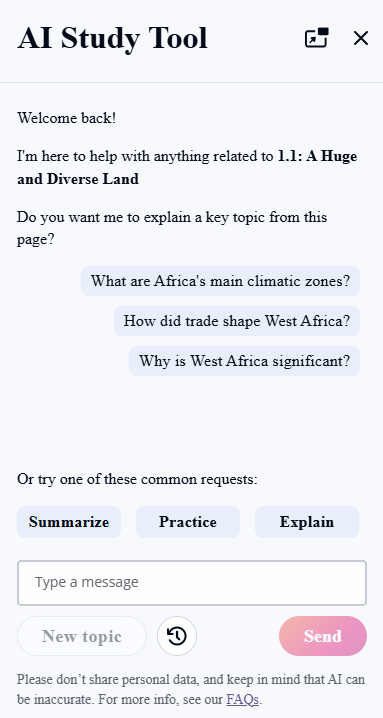
- Enter text to get help with anything related to the reading.
- Optionally, select a common request:
- Summarize - Generate concise summaries of chapters or sections.
- Practice - Generate multiple-choice and short answer questions tailored to specific topics or chapters.
- Explain - Ask questions and get AI-generated answers based only on eTextbook content.
- Select X to close the AI Study Tool.
Updated 26 Jan 2026