Share your location for attendance
Your instructor might track attendance with geofencing. Geofencing uses location-based technology to create a virtual fence around your classroom. If enabled, the geofence tracks whether or not you are inside your classroom during the live session.
 Join a live session with geofencing
- After you sign in to Live Response, select the Sessions tab.
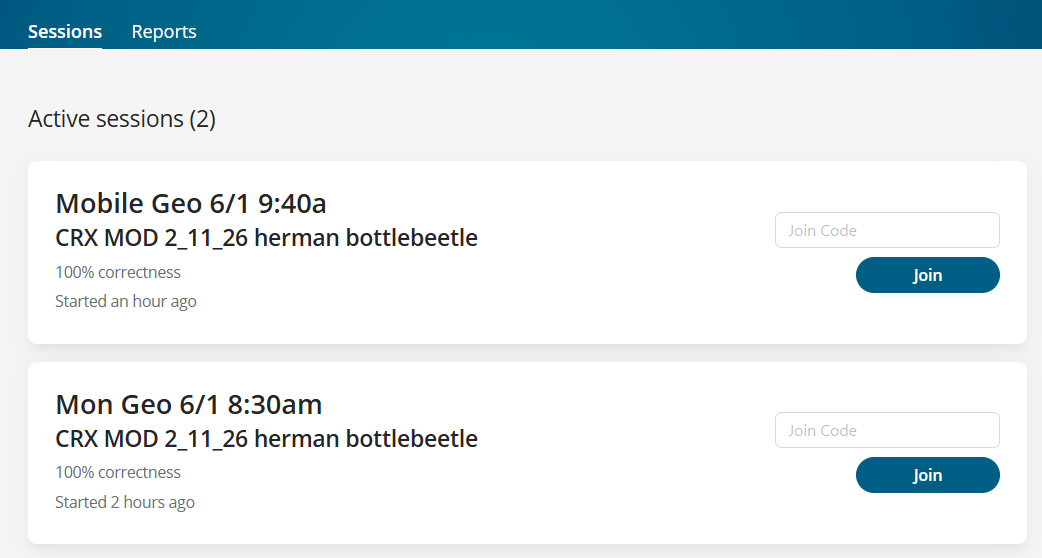
- Enter the join code provided by your instructor.
- Select Join.
If your instructor tracks your attendance with geofencing, Live Response performs a one-time check using location services and compares your location with the classroom coordinates.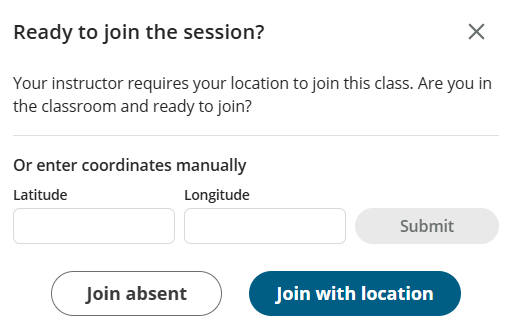
- If you are in the classroom and ready to join, you can:
- Manually enter your coordinates and select Submit.
- Select Join absent. Live Response allows you to join the session, but you are marked as absent.
- Select Join with location to join the session. Your browser checks your location.
If you are outside of the geofence, you can select Join absent to join the session, or select Try location again to share your location.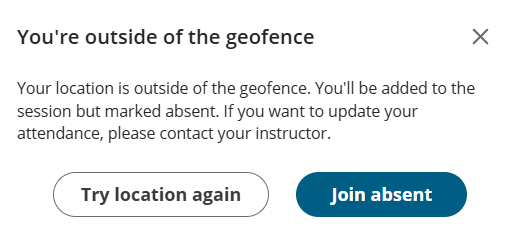
- Wait for your instructor to start the session.
How does geofencing work?
Your instructor chooses how to track student attendance during the live session.
- By sign in — Live Response tracks attendance when you enter the session code.
- With geofencing — Live Response tracks attendance by checking your location when you enter the session code.
When an instructor starts a session with a geofence, Live Response uses the instructor's device location to set a radius for the classroom location.
When a student joins a session with a geofence, Live Response checks the student’s location against the classroom location. Students must allow location sharing.
- Students within the radius are marked as In class.
- Students outside the radius can join the session but are marked Absent.
If a student is on a device with GPS, Live Response uses GPS for the most accurate location. If the device does not have GPS, Live Response uses browser-based network location (Chrome, Safari, Edge), which triangulates using nearby Wi-Fi access points.
Privacy: How do we use student location?
When students join a geofenced session, they are prompted to share their browser location.
Live Response performs a one-time check using the browser’s location services and compares that location with the classroom coordinates. This verifies that the student is within the boundary.
- Live Response does not store the student’s location or IP address.
- Live Response does not track the student's location during the session.
This is a one-time location check to mark the student as In class or Absent.
Updated 01 Jun 2026