Create profiles
To start using MyDietAnalysis (MDA), you create a profile. The Profiles page shows your profiles as cards. You can create up to six profiles. Each profile tracks up to seven days of diet and physical activity.
MyDietAnalysis uses profile information to:
- Calculate recommended nutrient intake based on USDA guidelines
- Create diet and physical activity reports
The profile you're currently using is indicated by a check mark next to the profile's avatar. Select an avatar image to choose a profile card.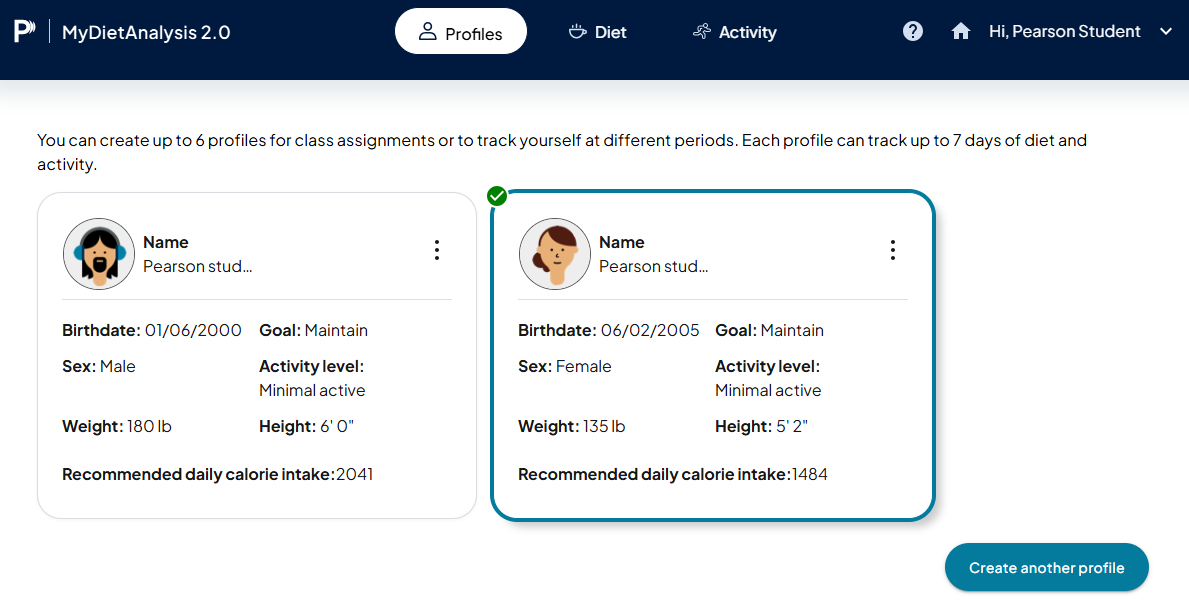
 Create a profile
- Open the Profiles page from:
- Your Mastering course — Select MyDietAnalysis from your Course Home navigation.
- Your standalone course — Select the Profiles tab.
- Select Create a profile.
Or
If you have existing profiles, select Create another profile.
The Create a profile page opens and you can add information.
Edit a profile
- On the profile card, select
 and choose Edit.
The Edit profile page opens and you can update information.
Check progress toward a profile's goals
- On the profile card, select and choose Progress.
The Progress window opens. - You can view the actual nutrients consumed compared to the profile goal.
- Use
 to see individual days or an average of all days.
Delete a profile
- On the profile card, select and choose Delete.
A warning message shows. - Select Delete to permanently delete the profile.
View dietary recommendations for a profile
- On the profile card, select and choose Recommendations.
A report opens and shows detailed recommendations for the profile.
Updated 24 Jun 2026