The Course Home page
Updated 16 Sep 2025
When they enter your course, students see the Course Home page. They use it to access all their course materials. You can customize this page and add class announcements.
By default, the Course Home displays a calendar, and the Assignments Due, Learning Path, and Announcements tabs. A MyWriting tab appears when students receive feedback on writing submissions. For example:
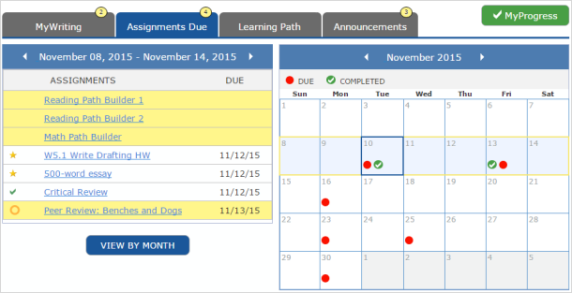
Notification icons  show how many assignments or announcements the student needs to view.
MyProgress takes students to their results page, where they can see their scores for assignments and for the course overall.
If available in your course, Learning Catalytics takes students to this additional learning tool.
 Assignments Due
The Assignments Due tab shows the Path Builders, activities, and assignments that the student needs to do in the week selected in the calendar. This tab appears only after you have added an assignment with a due date.
Learning Path
The Learning Path tab shows the content areas in your course and guides students through their work.
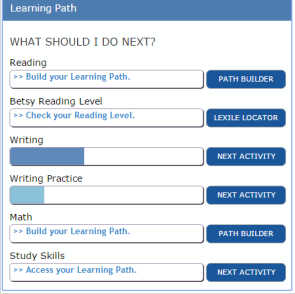
By default, student first select PATH BUILDER or PRE-ASSESSMENT to take an assessment that shows what they need to learn in the content area. The option then changes to NEXT ACTIVITY to take them to their Learning Path.
For Reading Level, LEXILE LOCATOR opens the Lexile Framework for Reading to assess a student's reading level. See Specialized assignment types for details.
See Edit the Learning Path for more information.
MyWriting
This tab appears when a student has received feedback on a Writing Skills essay, Writing Practice, or Writing Solutions assignment.
Announcements
The Announcements tab displays the announcements you have posted for the class. See Manage the Course Home page for information on creating and editing announcements.